Overview
If an individual withdraws their request to move in to your community, instead of deleting the housing contract you can now cancel their move in. You will also be able to re-activate a housing contract if they decide to move in at a later date.
Cancel Housing Contract
Step 1: Navigate to the individual whose housing contract you would like to cancel.
Step 2: To the right of the housing contract, click the blue Action button, click Cancel from the drop down.

Step 3: The housing contract will now have a label informing you the housing contract has been cancelled.

Note: Once a housing contract has been cancelled it will be removed from the standard Move In/Out report and Move In section of the dashboard.
Re-activate a Cancelled Housing Contract
Step 1: On the cancelled housing contract, click the blue Action button to the right, click Mark Active. This will re-activate the housing contract and allow you to continue the move in process.
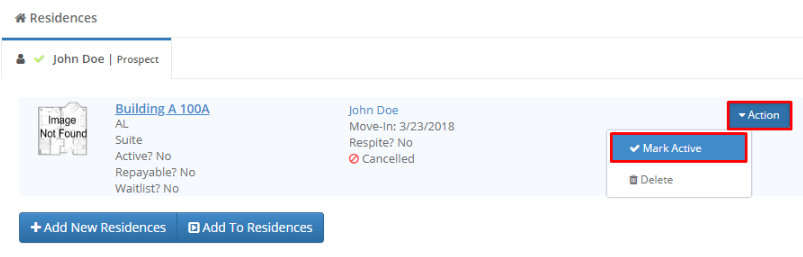
Note: Once a housing contract has been re-activated it will again appear on the standard Move In/Out report and the Move In section of the dashboard.
Was this article helpful?
That’s Great!
Thank you for your feedback
Sorry! We couldn't be helpful
Thank you for your feedback
Feedback sent
We appreciate your effort and will try to fix the article