Overview
In this article, we will review how to record a respite stay and transfer a respite stay to a permanent stay utilizing housing contracts.
Mark a Housing Contract for a Respite stay
Step 1: Navigate to the profile whose Housing Contract you would like to mark as Respite and click the Housing Contract button
Step 2: Click Add New/Existing Residences
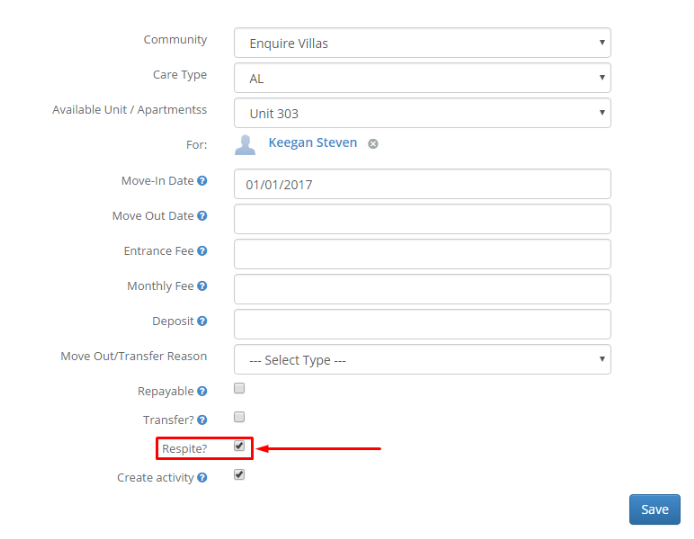
 Step 3: Fill out the necessary information for the new resident's Housing Contract, check the box labeled Respite, and click Save.
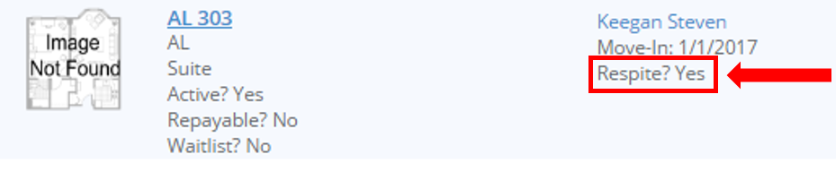
Step 4: This will now indicate that this Housing Contract is Respite.
Transfer a Resident to a Permanent Housing Contract
Step 1: Navigate to the Resident with the Respite Housing Contract and click the Residences button

Step 2: Click Move this Resident

Step 3: Fill out the Care Type, Available Unit/Apartment, Move-In Date (this date will also be the Move-Out Date for the previous Housing Contract), and a Transfer Reason if necessary. Ensure the Respite? checkbox is unchecked and the Transfer? check box is checked. Click Save.

Respite Stay in Reporting
Step 1: Navigate to Reports and run the Census Analytics Report

Step 2: Navigate to the Occupancy Detail table and drill through on the following data points to see whether that individual is a respite stay or not:
- Move Ins Drillthrough
- Move Out Drillthrough
- Upcoming Move Ins Drillthrough
- Upcoming Move Outs Drillthrough
- Transfer Ins Drillthrough
- Transfer Out Drillthrough
- Residents Drillthrough
- Second Resident Drillthrough
- Length of Stay Drillthrough
Note: To drillthrough, right click on any datapoint within the Occupancy Detail Table and select one of the desired drillthrough options.


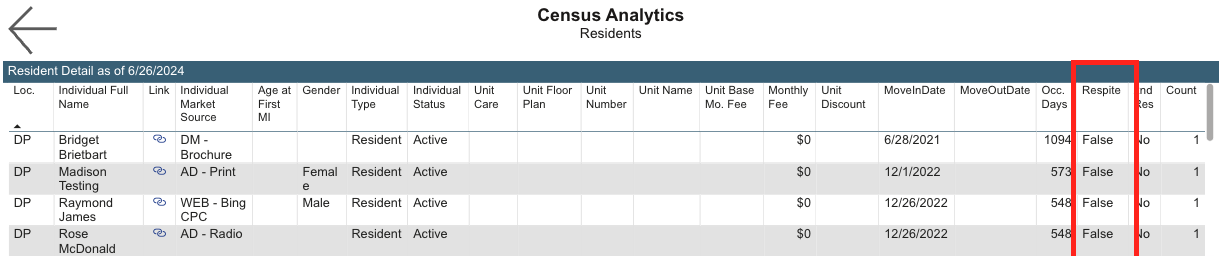
Step 3: After you have drilled through, you can view wether that individual is a respite stay or not.
- Status of "True" = Respite Stay
- Status of "False" = Non Respite Stay
See example below of the Resident Drillthrough page:
Important note: Respite housing contracts count towards census as a normal housing contract would. They do not alter or impact occupancy count.
Was this article helpful?
That’s Great!
Thank you for your feedback
Sorry! We couldn't be helpful
Thank you for your feedback
Feedback sent
We appreciate your effort and will try to fix the article