Overview
Keyword Alert notifications allow a member of your team to stay updated when notes from a digital lead integration contain text that matches with specified keywords. These keywords can be what ever fits your business' needs, like specific illnesses and medical conditions or topics of interest to discuss with the individual. Additionally, keywords are location specific so they can be customized based on a location's offerings.
Note: Keyword Alert notification has been updated to show for all users.
Setup
Step 1: Navigate to the admin section and click on the community you want to add the Keyword Alert to.

Step 2: In the upper right of the location's details page, click the Setup Alerts button.


Step 4: Input a Message to Users that you want displayed when alerts are triggered.
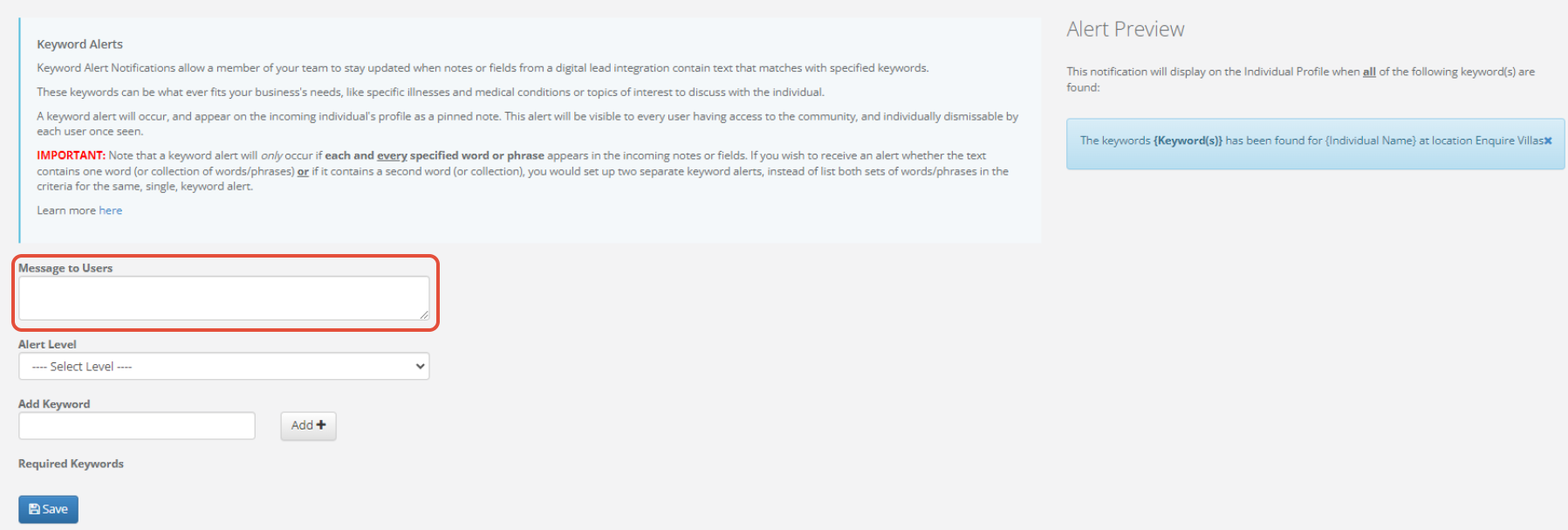
Step 5: Select an alert level from the Alert Level drop down. This will set the alert visual appearance and can help your team determine severity.
- Information - Blue
- Warning - Yellow
- Critical - Red

Step 6: Add Keywords by typing in keyword and clicking the Add + button.

Note: If you need to delete a keyword that was entered, simply find the word in the listing below and click the x in the box.
Step 7: Once you are finished adding a message to users, creating keywords, and choosing an alert level, click Save.
Usage
When individuals come in from any of your digital lead integrations (i.e. A Place For Mom, Caring.com, Allscripts), notes sent with the individual will be scanned to locate the keywords you specified for the location. If a matching keyword is found within the notes for the individual, a notification will be displayed at the top of the profile stating which keywords were found.
Currently for digital referrals only the digital information passed from the vendor is scanned for keywords. Attached documents such as PDF's are not scrapped for keyword alert.
Was this article helpful?
That’s Great!
Thank you for your feedback
Sorry! We couldn't be helpful
Thank you for your feedback
Feedback sent
We appreciate your effort and will try to fix the article