Overview
Alis is a comprehensive software designed to help you best manage your assisted living facility. Enquire's integration with ALIS allows you to send individuals from Enquire to ALIS.
Setup
Request Auth Token and Endpoint from ALIS. Reach out to ALIS and request the following information
- Auth Token
- Endpoint
In your request, please provide ALIS with your Company's Portal Id.
Plug-ins
All integrations require an Enquire team member to complete setup of the CRM Plug-ins. Please reach out to your Enquire Client Success Manager or our Integrations Team at integrations.support@alineops.com for further assistance.
Usage
Send an Individual to ALIS
Step 1: Navigate to the profile you would like to send to ALIS.
Step 2: In the upper right of the profile click the blue button labeled ALIS.
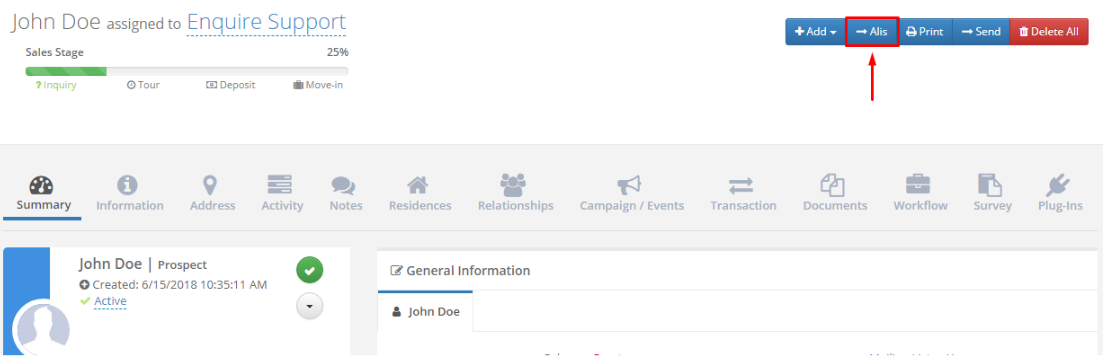
Note: If the individual was successfully sent to Alis you will see the following message:

Note: If the individual was not successfully sent to Alis you will see the following message:

Fields Sent
Alis can accept data from the following fields in Enquire:
| First Name* | Last Name* | Care Group Type (Housing Contract) | Care Level (Individual Profile) |
| Address Line 1 | Address Line 2 | City | State |
| Zipcode | Mobile Phone | Birthdate* | |
| Gender* | Current Arrangement | Medical Diagnosis | Ambulation |
| Primary Contact | Contact First Name | Contact Last Name | Contact Home Phone |
| Contact Mobile Phone | Contact Work Phone | Contact Email | Notes** |
| Payer Type (Pay Method) |
* - required to send a Resident to ALIS
Note: Notes are retrieved after the individual is sent to ALIS.
Updates Received
ALIS will push back updates to the "ALIS Status" form fields
- ALIS Resident Status = Resident / Applicant / Rejected
- ALIS Resident Assessment Status = Completed / In-Progress / Pending / Expired
NOTE: We will create a workflow to trigger a ALIS Assessment activity once populated as Completed. If you would like other workflows for activities or status, please reach out to your CSM or support.
ALIS FAQs
I am receiving the Unable to send resident to Alis message
- Make sure you included all communities needed in the setup email sent to our Integrations Team. If you happened to miss a community, send another email to our Integrations Team at and we'll get the additional communities added to your Alis integration.
- If the required fields and communities are correct, please send another ticket to integrations.support@alineops.com and we'll have our team investigate.
Was this article helpful?
That’s Great!
Thank you for your feedback
Sorry! We couldn't be helpful
Thank you for your feedback
Feedback sent
We appreciate your effort and will try to fix the article