New leads will be located in the Aline CRM Dashboard and/or Pre Lead section.
In Aline CRM, there are two reports that give you insight on your Roobrik leads. One is the Activity and People Analytics report and the other is the Sales and Marketing Analytics report (Individual Market Source tab). They each have value, but the Activity and People Analytics report gives you a clearer view of how a lead has interacted with Roobrik over time. Especially because Roobrik is not just a lead generation service, but is designed to educate and motivate buyers through a journey of discovery.
Sales and Marketing Analytics Report (Individual Market Source tab)
Filter by Market Source of "Roobrik" by clicking the "Search By Market Source" field and selecting "Roobrik." This should filter your list of prospects to those who have come into your account from Roobrik.
If you are using an ActiveDemand integration in tandem with an Aline CRM integration, the "Market Source" may not be Roobrik, and instead might reflect the original marketing source, depending on your specific lead processing workflows.
For example: A Prospect has clicks on a PPC ad which brought them to your community website, where they then clicked a Roobrik survey CTA and completed the Roobrik survey. The lead's original source would be PPC (or similar) because ActiveDemand can associate that lead with their original traffic source through the Roobrik > ActiveDemand integration.
Select a specific Prospect to view Prospect and Contact data
Once you click the Prospect's name, you will see the detailed contact record.
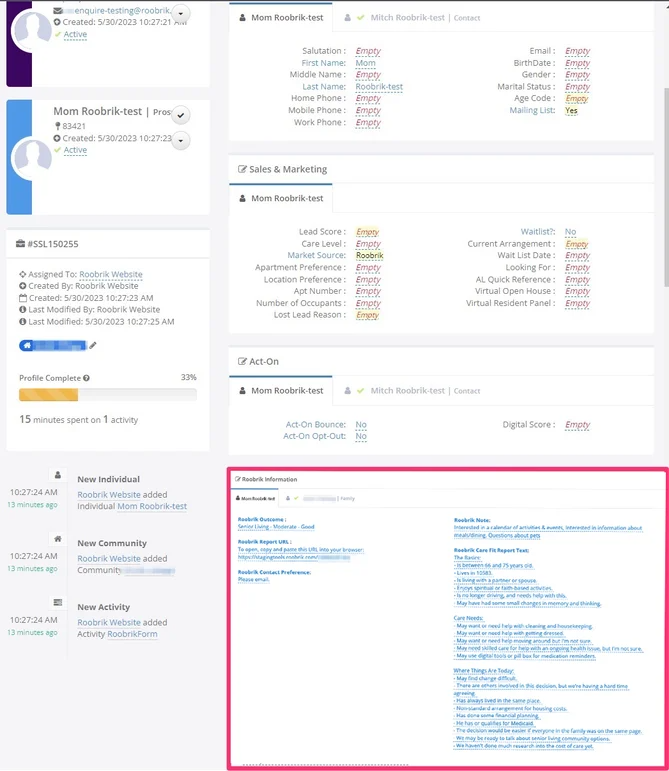
The following fields will be populated on the record:
- First Name, Last Name, Email and Phone fields will be populated on the Contact or Prospect record.
- A value of "Roobrik" will be populated in the Market Source field.
- The Relationship field is populated according to the contact's relationship with the prospect but is dependent on available values within the Aline CRM account. We match this as closely as possible, but in cases where no value is available, a value of "other" is passed.
- There is a specific area on each record for Roobrik Information (outlined in red). This contains the custom fields where we populate Roobrik survey information, including the outcome, report text, report URL, notes, and contact preference.
Was this article helpful?
That’s Great!
Thank you for your feedback
Sorry! We couldn't be helpful
Thank you for your feedback
Feedback sent
We appreciate your effort and will try to fix the article