When Roobrik is integrated with my Aline CRM portal, what happens when a lead converts?
When does a lead get pushed into Aline CRM?
Roobrik will push all Sales Opt-ins into Aline CRM as soon as they complete the survey, at the same time we send a lead notification email.
For more information about how Roobrik defines a Sales Opt-in, check out this article.
What information gets pushed into Aline CRM?
Two types of records can be pushed into Enquire with each survey opt-in: a Contact and a Prospect.
In Aline CRM, a Prospect is the future resident and a Contact is a person that has a relationship with the Prospect.
Contact
A Contact is created in Aline CRM only if the person taking the survey is doing so on behalf of another person. In this case, a linked Prospect record will also be created and the Roobrik Survey data will be visible on both records. Contacts are created with a relationship value based on your company's relationship types (i.e. Spouse, Friend, Relative, etc.) to indicate the relationship of the Contact to the Prospect.
Prospect
If the person takes the survey for themselves, a self-assessor, they will be pushed in as a Prospect. No associated Contact record will be created.
The following fields will be populated:
- First Name, Last Name, Email and Phone fields will be populated on the Prospect record for self-assessors and on the Contact record if the survey was completed for someone else.
- A value of "Roobrik" will be populated in the Market Source field (except when a marketing automation platform is setting the Market Source).
- The Relationship field is populated according to the contact's relationship to the prospect based on available values within your Aline CRM account. We match this as closely as possible, but in cases where no value is available, a value of "other" is used.
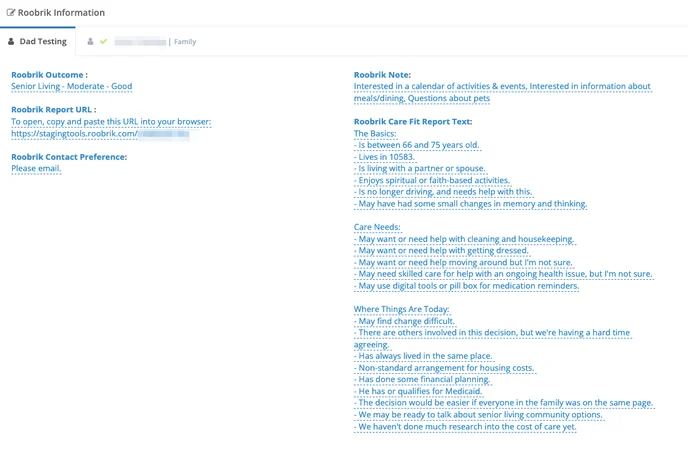
- There is a specific area on each record for Roobrik Information. This contains the custom fields where we populate Roobrik Survey information, including the outcome, report text, report URL, notes, and contact preference.
Was this article helpful?
That’s Great!
Thank you for your feedback
Sorry! We couldn't be helpful
Thank you for your feedback
Feedback sent
We appreciate your effort and will try to fix the article