Overview
In this article, we will review how to export your advanced search.
Exporting Advanced Search
Step 1: Choose a list from the Choose Saved List drop down or start a new search using the options in the Start New Search section.
Step 2: Once your search results are displayed, you can click the blue Export button in the Choose Saved List Section or the small Excel icon next to the number of results found by your search.
Step 3: Once the download for your exported list finishes, click on it to open it in Excel.
Step 4: You may receive a notification like the one below, click Yes.
Fields
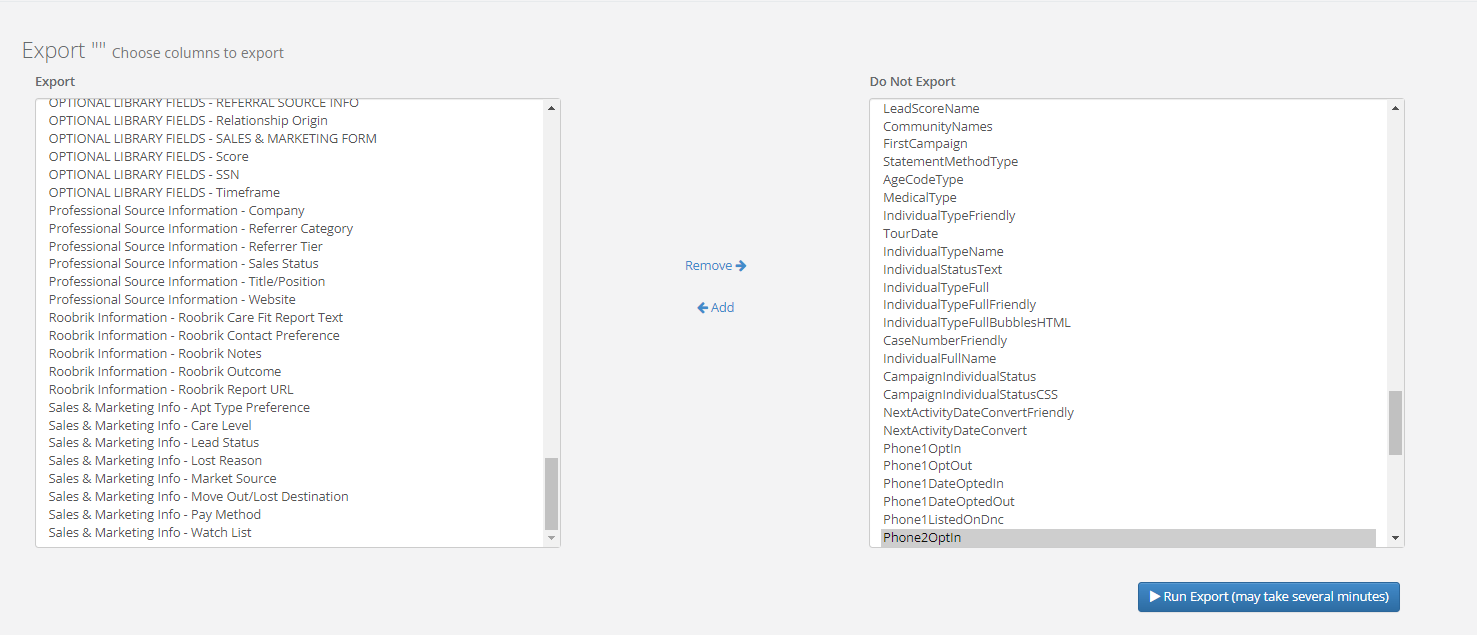
The fields below are what is exported in the Excel file. This can be found on the export page:
Individual ID | Case Number | Middle Name | Work Number | Address Line 3 | Time Zone |
| Community | Date Created | Last Name | City | Creator ID | |
| Individual Community Count | Salutation | Home Number | Address Line 1 | State | Case Status |
| Company Community Count | First Name | Mobile Number | Address Line 2 | Postal Code | Age |
| Assigned First Name | Assigned Last Name | Assigned User ID | Birth Date | Website | Type |
| Creator First Name | Creator Last Name | Accept Date | Last Modified | Title | |
| Primary Contact First Name | Is Mailing List | Email 2 | Market Source | Inquiry | Fax |
| Primary Contact Middle Name | Campaign Name | Campaign ID | Market Source ID | Care | Lead Score Submitted |
| Primary Contact Last Name | Campaign Response | Spouse Name | Sales Status | Method of Contact | Expected Need |
| Campaign Reponses Array | Primary Contact Email | Primary Contact Address Line 1 | Primary Contact City | Primary Contact State | Current Arrangement |
| Full Name with Spouse | Primary Contact Full Name | Primary Contact Address Line 2 | Primary Contact State | Primary Contact Postal Code | Apartment Preference |
| Primary Contact Relationship | Primary Contact Home | Primary Contact Postal Code | Primary Contact Power of Attorney | Memory Loss | Ambulation Type |
Primary Contact Mobile | Primary Contact Work | Referral First Name | Referral Last Name | Referral Company Name | Gender |
| Marital Status | Religion | Language | Ethnicity | Veteran | Is Waitlist |
| Waitlist Priority | Waitlist Date | Task Move In Date | Task Move Out Date | Lease Move In Date | Lease Move Out Date |
| Active Lease Yes No | Move Out Reason | Lost Lead Reason | Unqualified Reason | Care Group | Floor Plan Group |
| Unit ID | Deposit | Entrance Fee | Monthly Fee | Lease Plan | Contract Type |
| Row Number | Individual Type ID | Campaign Individual Status ID | Lead Score Name | Community Name | First Campaign |
| Statement Method Type | Age Code Type | Medical Type | Individual Type Friendly | Tour Date | Individual Type Name |
| Individual Status Text | Individual Type Full | Individual Type Full Friendly | Individual Type Full Bubbles HTML | Case Number Friendly | Individual Full Name |
| Campaign Individual Status | Campaign Individual Status CSS | Next Activity Date Convert Friendly | Next Activity Date Convert | Phone 1 Opt In | Phone 1 Opt Out |
| Phone 1 Date Opt In | Phone 1 Date Opted Out | Phone 1 Listed on DNC | Phone 2 Opt In | Phone 2 Opt Out | Phone 2 Date Opted In |
Phone 2 Date Opted Out | Phone 2 Listed On DNC | Phone 3 Opt In | Phone 3 Opt Out | Phone 3 Date Opted In | Phone 3 Date Opted Out |
Phone 3 Listed On DNC | Addresses - Address Line 1 | Addresses - Address Line 2 | Addresses - City | Addresses - Country | Addresses - County |
Addresses - End Month | Addresses - Has Address | Addresses - Has Email | Addresses - Has Phone | Addresses - Mailing Name | Addresses - Postal Code |
| Addresses - Start Month | Addresses - State | Company - Organization Tier 1 Type | Company - Organization Tier 2 Type | Company - Organization Tier 3 Type | Company - Organization Tier 4 Type |
| Company - Organization Type | Company - Top 5/Targeted | Company - Visit Frequency |
Was this article helpful?
That’s Great!
Thank you for your feedback
Sorry! We couldn't be helpful
Thank you for your feedback
Feedback sent
We appreciate your effort and will try to fix the article