Configuring Global Email Templates in Enquire MAP
There are two types of Email templates in Enquire MAP:
- Style templates - templates that are used as a style basis for creating a new email.
- Content templates - template that contains purpose specific content for emails.
Whether it is a style template or a content template, both are essentially globally accessible Emails stored in the Email library of 'All Accounts'. Both types of templates are accessible by selecting 'All Accounts' in the toolbar account selector. Then choosing the left menu bar item
Navigate to Assets > Email Library
Those emails that have no associated account are globally accessible templates. The differentiation between the two types of templates is made in the 'Target' section of the stored email.
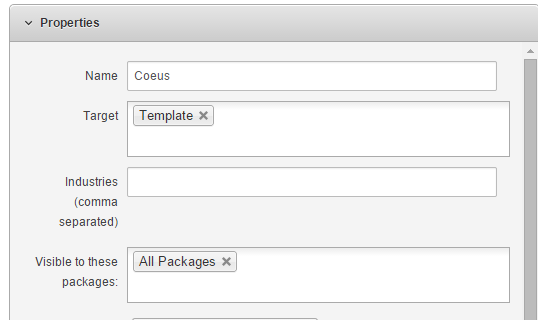
Targets
Template: This designates a style template. This template will show up as a 'Style Template' whenever a new email is being built.
Prospect: This is a content template that will show up whenever a Prospect Email action in a workflow is being created.
All: This email will always show up, both as a style template and as a content template
Sales: This email is a content template that will show up in any new email creation for a Email Sales Sales workflow action.
Marketing: This is a content template that will show up in any new email created using an Email Marketer workflow action
Sender: This is a content template that will show up in any new email created using an 'Email Sender' workflow action
Private: This is a template that is used for system functions. This template will never show up, but is used in system functions.
Please reach out to the dedicated Enquire Account Manager or Enquire MAP Support team for further assistance.
Was this article helpful?
That’s Great!
Thank you for your feedback
Sorry! We couldn't be helpful
Thank you for your feedback
Feedback sent
We appreciate your effort and will try to fix the article