Your logo plays a significant role in defining your brand's identity. To ensure that it appears flawless in all your Roobrik surveys, we have created a detailed guide outlining the specific requirements for your logo images.
File Format:
For optimal results, we recommend sending EPS or Vector files for your logo. PNG formats with transparent backgrounds are also suitable. It's best to avoid using JPG images as they do not support transparency.
- ✅ Vector Files (.ai, .eps, .svg): Will scale without losing quality and support transparency.
- ✅ PNG: Great for web use and supports transparency.
- ❌ JPG/JPEG: Doesn’t support transparency.
Logo Size and Orientations:
- Logo Size: For optimal display, it is recommended that the logo image has a minimum width of 500px. Larger images can also be provided.
- Logo Orientation: If your logo is available in various orientations, such as horizontal or stacked versions, please feel free to provide both. We will consider the available space when selecting the orientation that best suits the survey layout.
Color Specifications:
Make sure to provide a full-color version of your logo. If you have a version specifically made for dark backgrounds (reversed), feel free to include that too. If not, we can adjust the full-color version to work on darker backgrounds as needed.
- Full Color: The usual, colorful version of the logo on a transparent background.
- Reversed: A version that looks good on dark backgrounds. This is usually white.
Roobrik Surveys motivate as they educate. Designed for two-sided discovery, for the buyer and seller.
Buyers are led on an educational and empathetic journey that leaves them more prepared and confident in a next step.
Sellers have discovery conducted for them. Roobrik delivers key prospect insights that enable meaningful conversations that convert.
Yes! We can assist you in gaining visibility into your user’s interactions with Roobrik Surveys.
Because every client’s tagging and measurement strategy varies, we cannot offer specific GTM tag creation/configuration instructions. We would, however, be happy to install your GTM container on your Roobrik Survey(s) and consult with you to find the best way to accomplish your goals.
By default, the container is loaded to all the survey pages for more granular tracking. However, if you would prefer the script to load only on the landing page and the results page (after completion), that is an option as well.
Since our reporting is a mix of analytics data and data that we capture and store directly in our database, the numbers you might see in analytics may not match 1:1 exactly with what we report at the end of each month. The data we store directly in our database will be more accurate when compared to your analytics platform, but your numbers should be close enough to give you general direction and/or summary insights.
What does Roobrik need from me to install GTM on my survey(s)?
All we will need from you is the GTM script itself. After you have logged into Google Tag Manager, and selected the container for which you want to retrieve the script, you should see two sets of code: one for the <head> of your website and the other for the <body> section.
Just copy both snippets to share with your Roobrik Client Success Manager, and we’ll get it installed promptly!
The code for the <head> section typically looks like this:
<!-- Google Tag Manager -->
<script>(function(w,d,s,l,i){w[l]=w[l]||[];w[l].push({'gtm.start':
new Date().getTime(),event:'gtm.js'});var f=d.getElementsByTagName(s)[0],
j=d.createElement(s),dl=l!='dataLayer'?'&l='+l:'';j.async=true;j.src=
'https://www.googletagmanager.com/gtm.js?id='+i+dl;f.parentNode.insertBefore(j,f);
})(window,document,'script','dataLayer','GTM-XXXXXX');</script>
<!-- End Google Tag Manager -->
The code for the <body> section looks like this:
<!-- Google Tag Manager (noscript) -->
<noscript><iframe src="https://www.googletagmanager.com/ns.html?id=GTM-XXXXXX"
height="0" width="0" style="display:none;visibility:hidden"></iframe></noscript>
<!-- End Google Tag Manager (noscript) -->
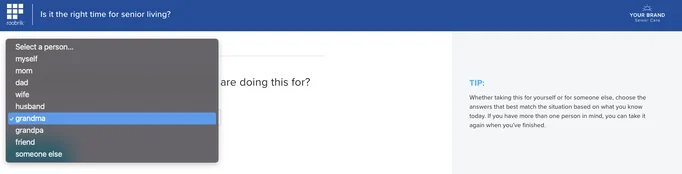
There are two types of Roobrik assessment takers, a self-assessor and a non-self-assessor.
Self-Assessor
When it comes to selecting who the assessment is being completed for, self-assessors simply choose "myself" from the dropdown menu.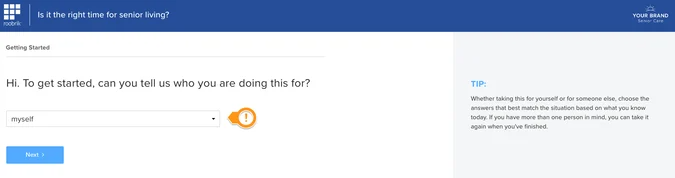
NOTE:
Some surveys use "me" instead of "myself."
"Me and my spouse/partner" is also treated as a self-assessor.
Non-Self-Assessor
When it comes to selecting who the assessment is being completed for, non-self assessors choose any option other than "myself" from the dropdown, as seen here:
Roobrik improves your conversion rates by providing unique prospect insights to sales, enhancing engagement, and creating a distinct experience for prospective residents.
Roobrik on your community websites improves your conversion rates and yours alone:
- If a competitor is also using Roobrik, it does not diminish the value Roobrik delivers to you. Each Roobrik lead is unique, accompanied by over 20 prospect data points for your community team. These insights are invaluable for your sales team, helping them have better and more meaningful conversations, which leads to higher conversion rates.
- Communities using Roobrik see significant improvements in engagement and lead conversion, with 20-40% more web leads and increased time spent on their websites. Our solutions help you establish a stronger connection with potential residents early in their decision-making process, converting more researchers into residents for your communities.
Roobrik solutions are customized for your communities:
- Our solutions are adaptable to the specific needs of each client, ensuring that each implementation is unique. Customization helps your community stand out, even if competitors are using the same underlying solutions.
- By tailoring our solutions to reflect your community's unique values and needs, Roobrik enables you to create a distinct experience for prospective residents, enhancing your competitive edge.
Market presence:
- While Roobrik is widely adopted, we are far from market saturation. Roobrik serves thousands of communities across hundreds of senior living providers, yet we still only serve a fraction of the potential market.
- Market saturation in smaller geographies can actually be a net benefit. A more informed consumer means an easier sales process. If your competitor uses Roobrik and you don’t, consumers may view your competitor as more helpful and invested in finding the right solution for them, even if it’s not their community. Therefore, adopting Roobrik ensures you remain competitive and perceived as a leader in customer care.
Learn which integrations seamlessly support the transfer of Marketing Opt-ins, enhancing your marketing automation strategy for optimal efficiency and growth.
HubSpot
Roobrik’s HubSpot integration makes use of the standard HubSpot property, “Lifecycle Stage” to distinguish Marketing Qualified Leads (MQLs) from Sales Qualified Leads (SQLs).
Interested in using advanced filters in HubSpot to efficiently organize your MQLs and SQLs? Look no further! Simply follow the instructions provided here.
ActiveDemand
In ActiveDemand, each Roobrik lead pushed into your account will include a form field called Roobrik Lead Status. This field will have a value of either Sales qualified lead or Marketing qualified lead based on how the lead answered the opt-in questions on the Roobrik Survey.
That's a fantastic question! We highly recommend a direct integration for both the CRM and MAP. Here are a few factors to take into consideration.
1. Our monitoring systems let us know if something is amiss
We want to make certain that all the information we send is passed successfully. We have systems in place that will alert us if the pass to either the CRM or MAP fails. If an internal sync between your MAP to CRM (or vice versa) fails for any reason, the systems that normally would alert us would not.
2. The format in which we pass the information differs between a CRM and MAP
In general, MAP integrations are intended to strengthen the ability to segment lists based upon individual assessment questions and answers. So, for MAP integrations, we push in assessment results in the form of individual question and answers. Doing so would allow you to segment an email list targeting all contacts who filled out a Roobrik assessment on behalf of their dad who believe they’re financially ready for the move, as one example.
CRM integrations are formatted in a block text with bullet points — it’s easier to read than individual questions and answers. This allows sales counselors to more easily read and digest the Roobrik assessment results.
3. We check for duplicates
We recognize the importance of avoiding duplicate entries. To address this concern, we have incorporated a duplicate checking process into our integrations to reduce the likelihood of duplicate entries in your CRM and/or MAP.
If you are interested in learning more about our process for managing duplicate entries in your CRM and/or MAP, please refer to the links provided below for more detailed information.
Was this article helpful?
That’s Great!
Thank you for your feedback
Sorry! We couldn't be helpful
Thank you for your feedback
Feedback sent
We appreciate your effort and will try to fix the article