Knowledge Management System Overview
The KMS is designed to provide your contact center team with all the information needed to be successful on our interactions. The information should allow the contact center to be an informed resource for your prospects without going into too much detail. The contact center will not discuss each section of the KMS on every interaction, only the areas that apply to that interaction.
The KMS includes information such as:
- Community amenities
- Unique features/offerings
- Apartment descriptions
- Care services/staff
- Lead/tour assignment instructions
Accessing and Editing KMS
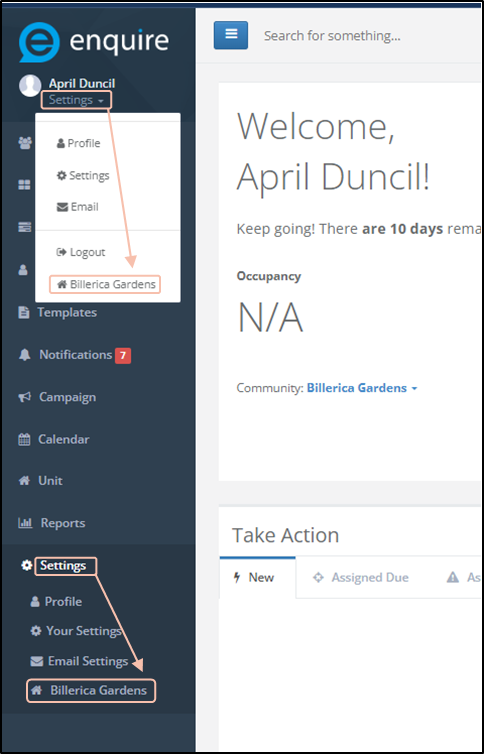
After logging in, click “Settings” from the left navigation bar and then the desired location name. You will be redirected to the corresponding KMS.
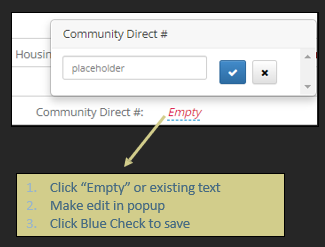
You will edit the KMS the same way you would edit information in a profile. Simply click the desired field, make your edits and push the blue check to save.
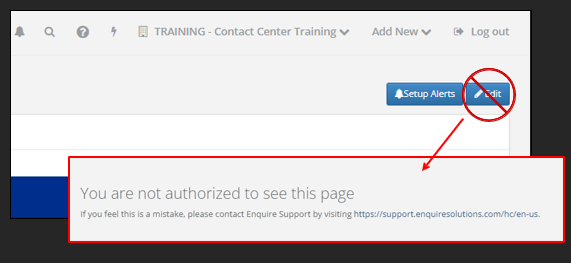
Note: You will see an “Edit” button in the upper right corner. Do not click this button as doing so will result in an error message advising “you are not authorized to see this page”. This button is used by Aline admins to edit backend information.
Best Practices
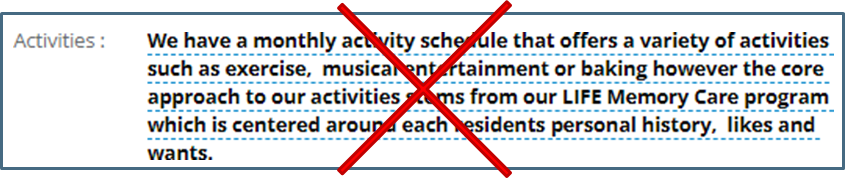
- Don't write long sentences/paragraphs of information. DO provide information as a brief list.
- Do provide information as a brief list. The team will need to reference these items quickly on calls. Short info is generally easier to reference during a call. If there are items you believe need further explanation, reach out to the onboarding team so they can ensure the team is trained on more detailed information or processes
- Don't provide a general explanation.
- Do provide specific information. If the information is on the KMS, it may be discussed during the call. Some information such as detailed pricing is best discussed with the onsite experts. Contact center will only discuss intro/starting price.
KMS General Information
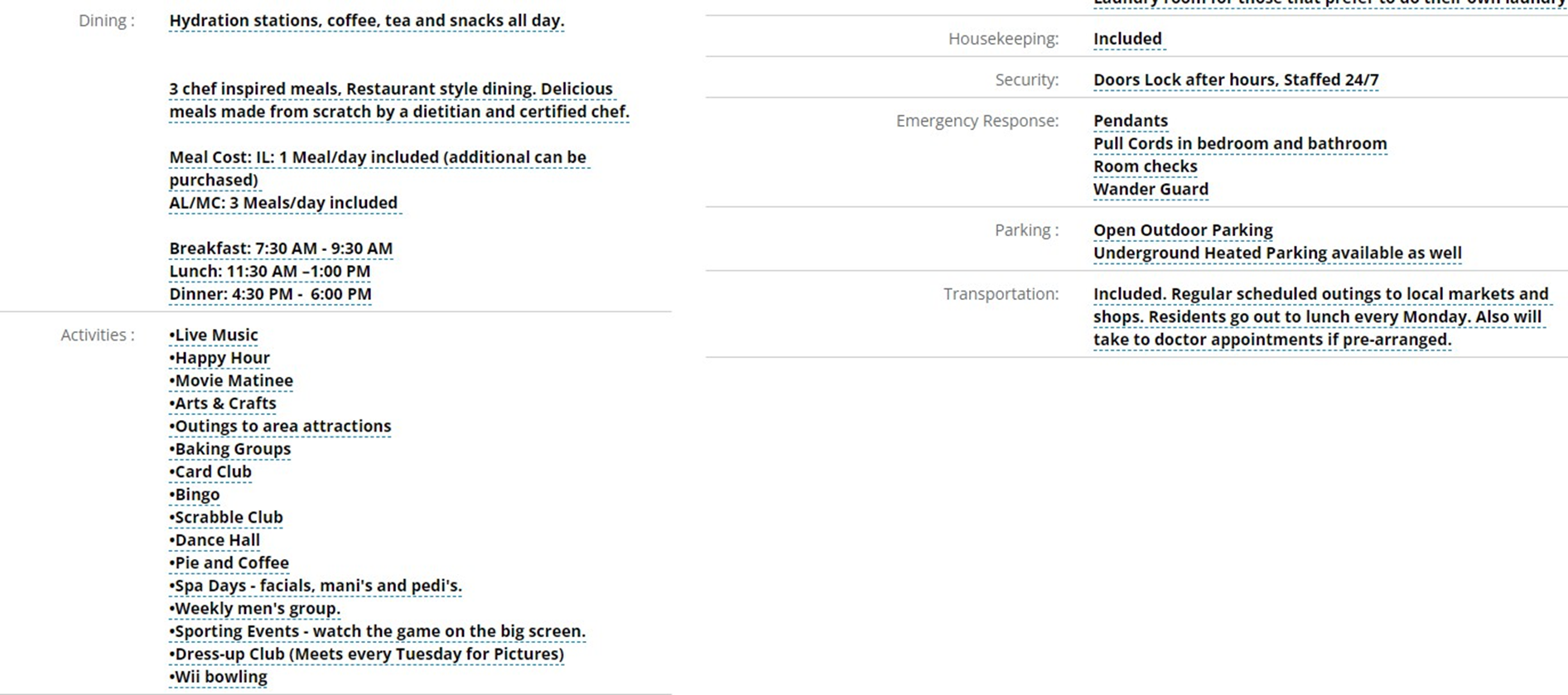
Community Name:: Full name of community. Provide phonetic spelling
Aline Product: Adjusted by Aline
Housing Types Provided: All levels of care provided at community. If additional services such as respite or adult day are available, checkmark as well.
Aline Direct: Do not adjust
Community Direct: Number that rings directly to front desk
Community Direct #2: If applicable, secondary direct dial. This might be a nursing station or a back office.
Community Main: Main number to community (might be the same as above)
Community Fax: Main fax number at community
Community Address: Physical address of community. If there is a temporary sales office, include temp address as well.
Pay Method/Payment Programs: List of financial programs that are accepted such as LTC or VA (not how you collect payments – direct deposit, check, etc.). If there are financial programs that are not accepted but commonly asked about, please list that you do not accept ABC.
Age Requirement: Minimum age to be a resident and approximate average age of current residents. Notate if exceptions can be made.
Floor Plans: List of floor plan types
Pets: Are pets accepted? Breed or weight restrictions?
Smoking: Can residents smoke at community? Where?
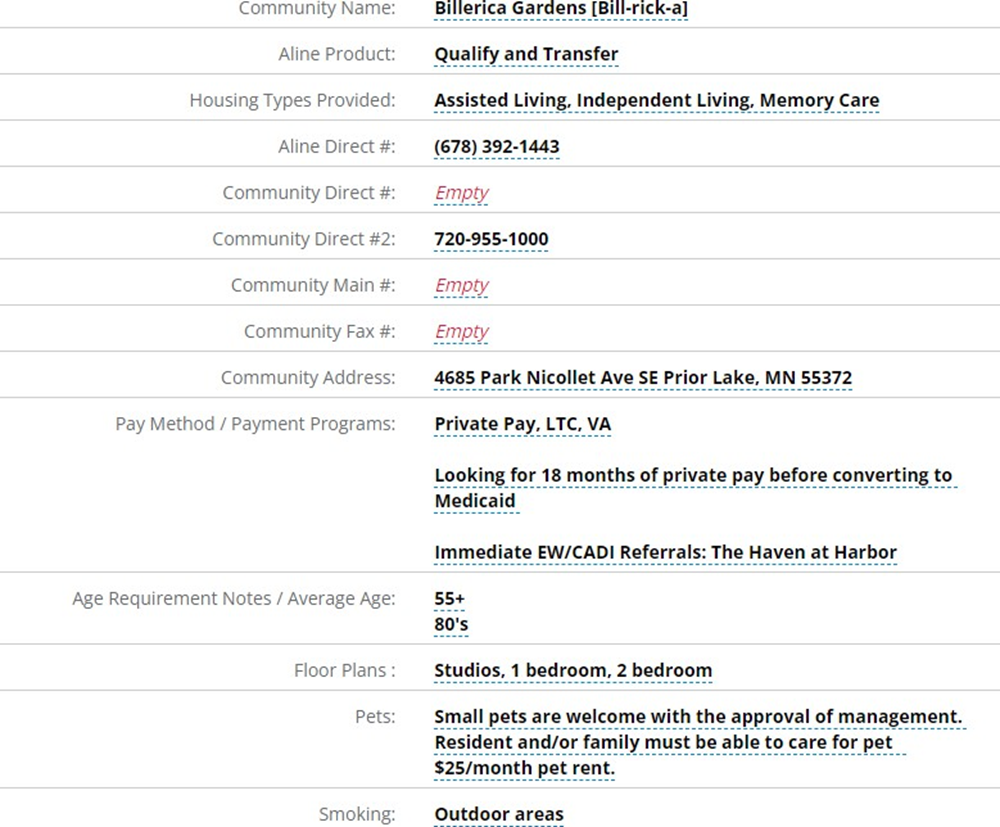
Fitness: List examples of activities or groups related to physical activity
Common Areas: List of indoor common areas that residents can enjoy. If a common area is exclusive to a specific level of care, this can be noted by adding the level of care abbreviation at the end. For example, “Calm Room (MC)”
Religious Services: List of religious services/activities a resident can attend at the community. May also list nearby religious services that residents attend outside of community.
Salon: Is there a salon onsite? Typical services available. Are services an additional fee
Television: Are cable services available at the community or within resident units?
Telephone: Do residents have access to a communal phone? Can they setup services in their unit?
Internet: Are residents able to access Wi-Fi throughout community? Is there a business center with internet? Can they setup services within their unit?
Maintenance: Indicate level of onsite maintenance available.
Utilities: Indicate which, if any, utilities are included with monthly rent.
Laundry: Is laundry included? Do services vary by level of care? Are there limits such as bedding only? Can residents access a communal laundry room or pay for laundry services? Are there washers/dryers in unit or hookups for residents to bring their own?
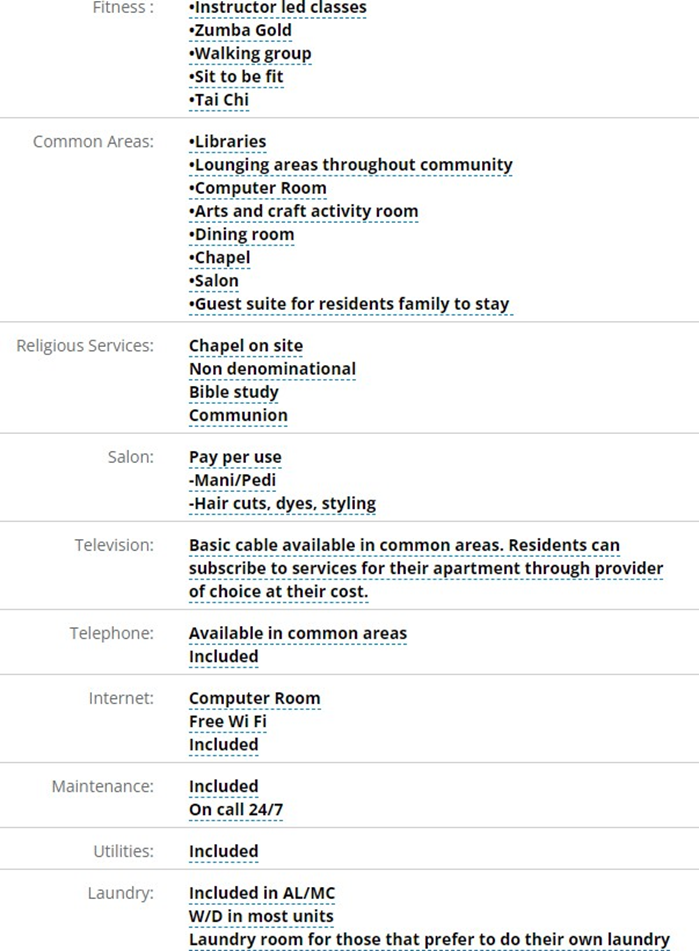
Dining: Which meals are included? Family or restaurant style? List hours for each meal period. What is available outside of these meal periods? What types of dietary restrictions/modifications can be accommodated?
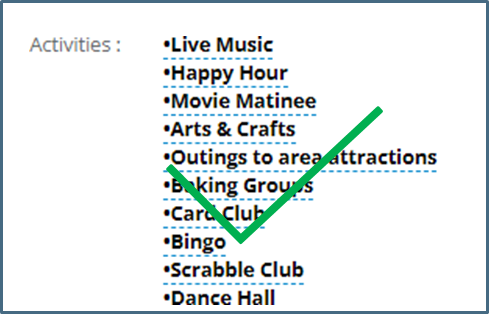
Activities: List of scheduled activities for residents to enjoy. Note, if an activity already appears under Fitness, Common Areas or Religion, no need to list twice.
Housekeeping: Are housekeeping services included? Are there limitations to the services? Frequency of services. Do levels of care impact services, if so how?
Security: List of community features to keep residents/staff safe such as gated community, keypads or security cameras.
Emergency Response: Features available to residents to prevent or respond to an emergency such as pull cords, pendants, or wander guards.
Parking: Explain types of parking accommodations for residents such as outdoor or indoor parking. Are there fees or any parking accommodations? Does staff offer valet services?
Transportation: Types of transportation available for resident use. Can residents arrange for personal transportations? Are there limitations on distance or frequency of use? Scheduled group trips?
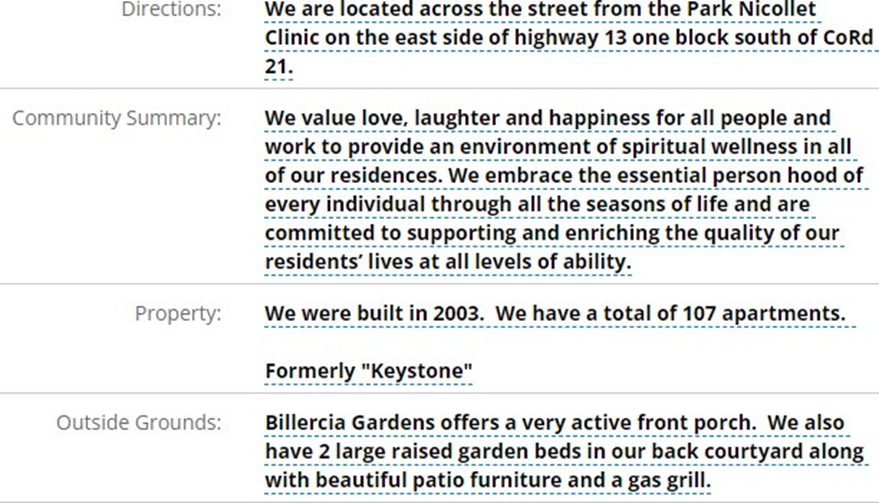
Directions: Provide directions to someone already familiar to the area; ideally with landmarks rather than GPS turn by turn directions.
Community Summary: 2-3 sentences that give a general description of the community. This is the “elevator pitch” of sorts.
Property: Description of the physical building such as year built/renovated, number of stories, total unit count, unique building/architecture features. If community went through name change, list former name.
Outside Grounds: Description of outdoor community areas
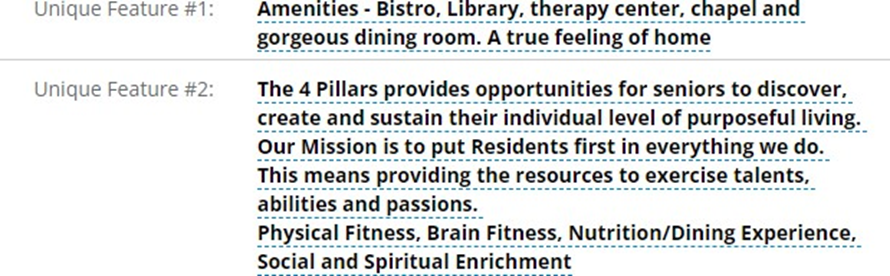
Unique Feature: List up to 4 different unique features that make your community stand out from nearby competitors such as unique care philosophy or amenities.
Independent Living
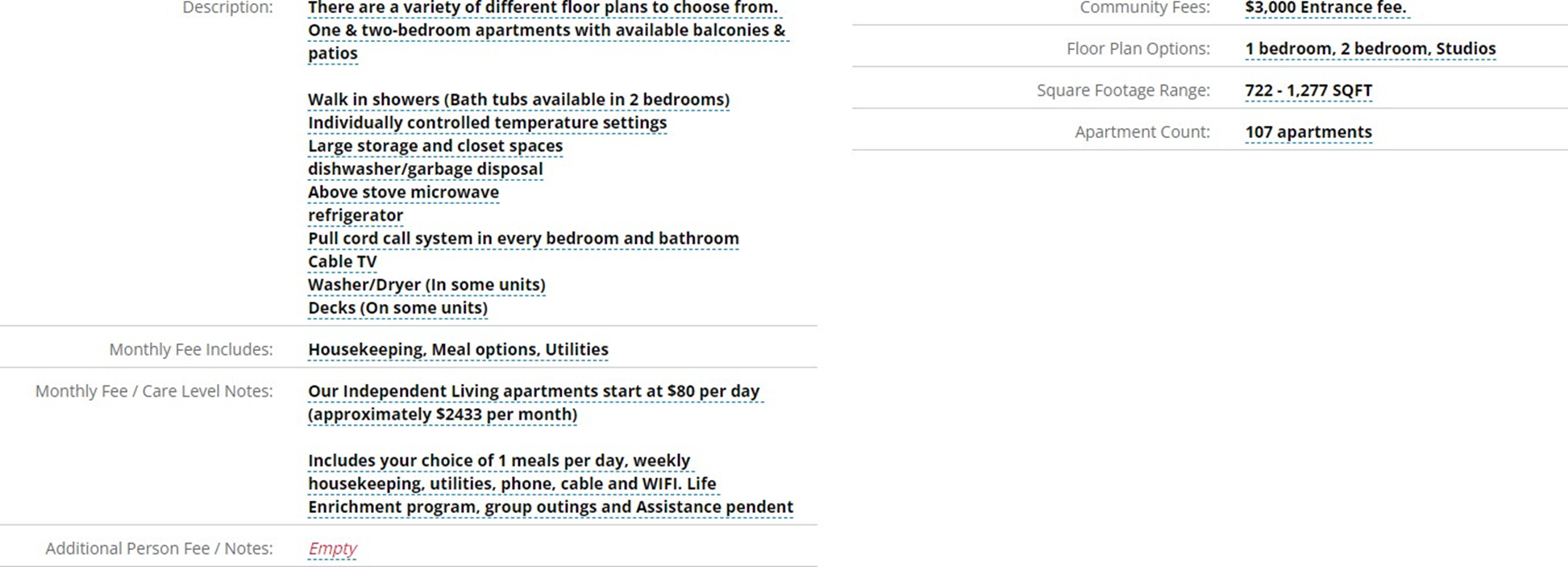
Description: Description of Independent Living apartments and the features available within the unit such as walk in showers, full kitchens, patios, extra storage unit, etc.
Monthly Fee Includes: Checkmark the items that are included within monthly rent
Monthly Fee / Care Level Notes: Provide starting rates for lowest cost unit. Elaborate on services included in rent as needed if applicable.
Note: We strongly recommend against listing detailed pricing for all unit types and/or levels of service.
Additional Person Fee / Notes: If applicable, list fee for additional person in same unit or other notes about sharing a unit.
Community Fees: Info about 1 time community fees.
Floor Plan Options: List types of floor plans available in Independent Living.
Square Footage Range: List square footage range for Independent Living units.
Apartment Count: Number of Independent Living apartments. If there are multiple types of accommodates such as apartments and standalone cottages, list count by type.
Note: If the community does not offer Independent Living, list "N/A" in the description field. If there is a nearby sister community that offers Independent Living that the contact center can refer to, please list in the description field.
Assisted Living
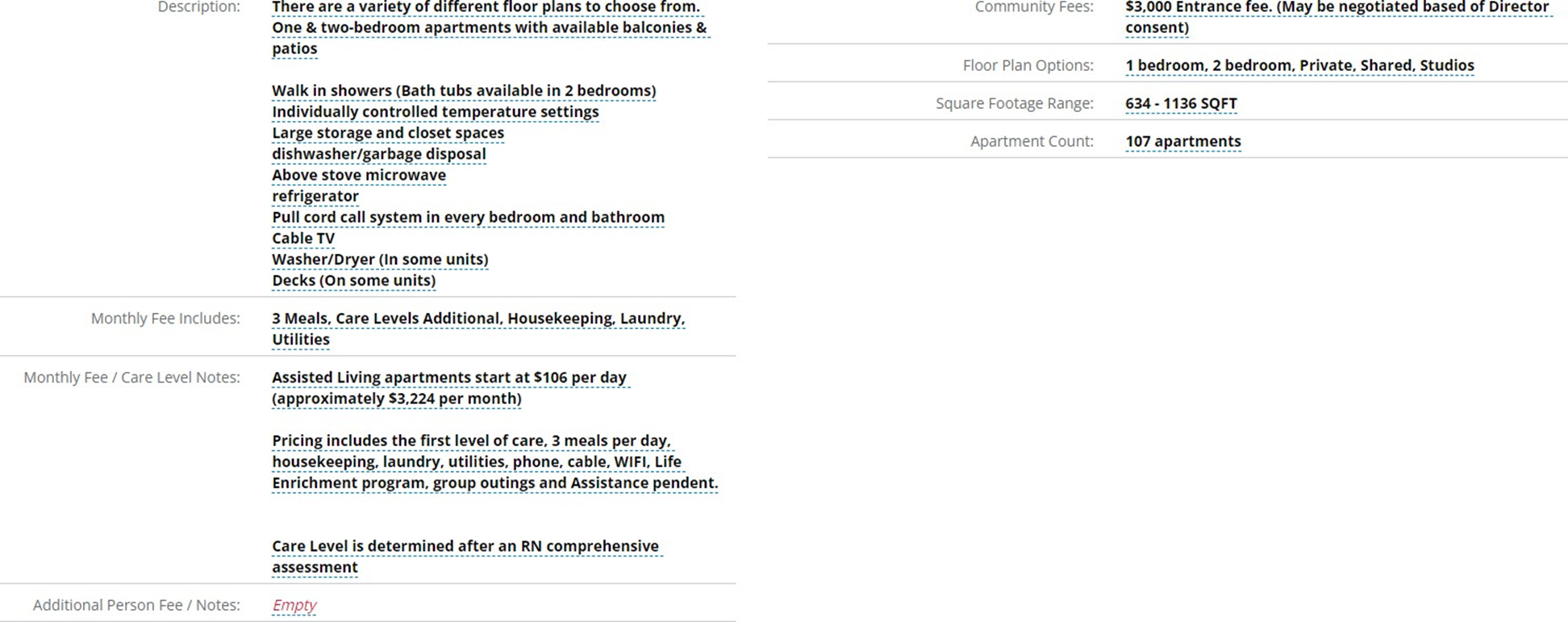
Description: Description of Assisted Living apartments and the features available within the unit such as walk in showers, kitchenettes, patios, pull cords, etc.
Monthly Fee Includes: Checkmark the items that are included within monthly rent.
Monthly Fee/Care Level Notes: Provide starting rates for lowest cost unit. Elaborate on services included in rent as needed.
Note: We strongly recommend against listing detailed pricing for all unit types and/or levels of service.
Additional Person Fee / Notes: If applicable, list fee for additional person in same unit or other notes about sharing a unit.
Community Fees: Info about 1 time community fees.
Floor Plan Options: List types of floor plans available in Assisted Living.
Square Footage Range: List square footage range for Assisted Living units
Apartment Count: Number of Assisted Living apartments.
Note: If community does not offer Assisted Living, list "N/A" in the description field. If there is a near by sister community that offers Assisted Living that the contact center can refer to, please list in the description field.
Memory Care
Description: Description of Memory Care apartments and the features available within the unit such as walk in showers, full kitchens, patios, extra storage unit, etc. This is also a great place to include details about Memory Care only common areas such as a gated courtyard.
Monthly Fee Includes: Checkmark the items that are included within monthly rent
Monthly Fee / Care Level Notes: Provide starting rates for lowest cost unit. Elaborate on services included in rent as needed if applicable.
Note: We strongly recommend against listing detailed pricing for all unit types and/or levels of service.
Additional Person Fee / Notes: If applicable, list fee for additional person in same unit or other notes about sharing a unit.
Community Fees: Info about 1 time community fees.
Floor Plan Options: List types of floor plans available in Memory Care.
Square Footage Range: List square footage range for Memory Care units.
Apartment Count: Number of Memory Care apartments. If there are multiple types of accommodates such as apartments and standalone cottages, list count by type.
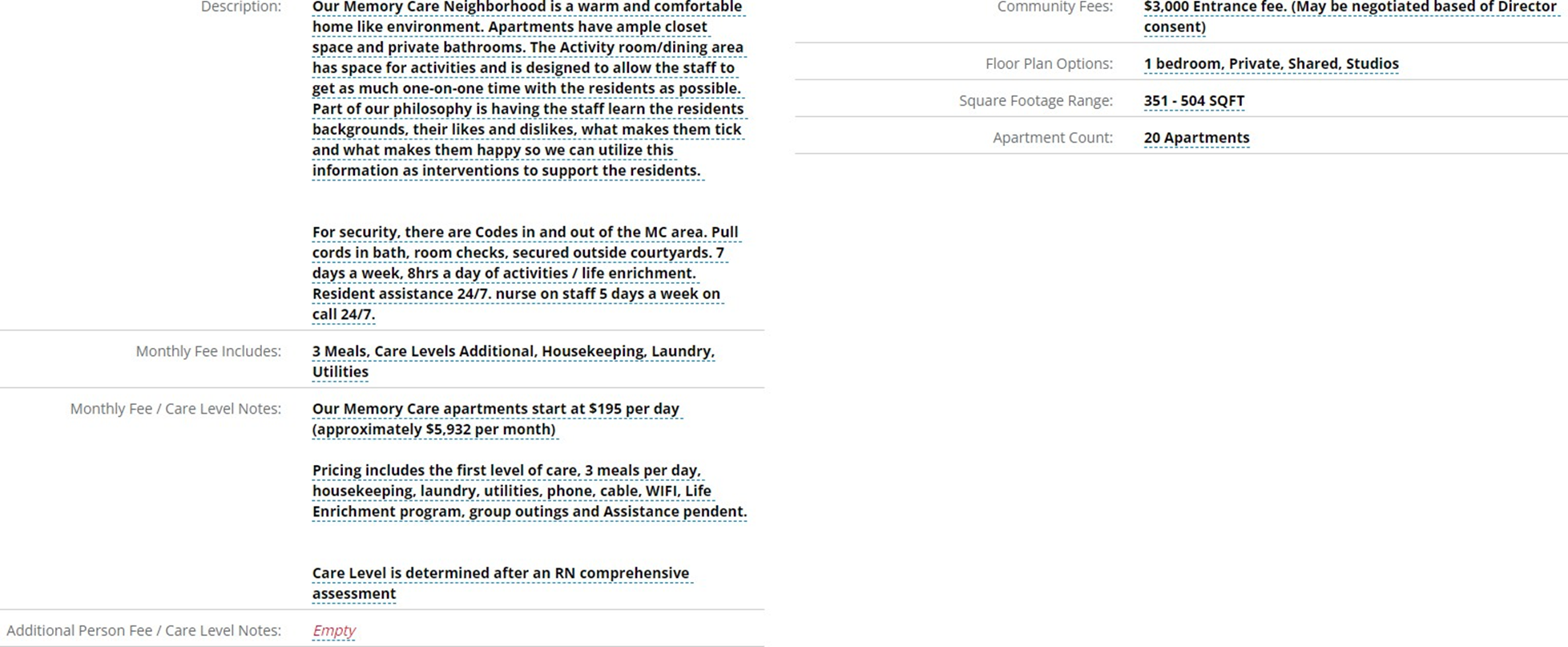
Note: If community does not offer Memory Care, list "N/A" in the description field. If there is a near by sister community that offers Memory Care that the contact center can refer to, please list in the description field.
Skilled Nursing / Rehabilitation
Description: Description of SNF units and the features available within the unit such as walk in showers, kitchenettes, etc. This is also a great place to include details about SNF only common areas such as therapy gym.
Daily Rates Includes: Checkmark the items that are included within daily rent.
Daily Rate / Care Level Notes: Provide starting rates for lowest cost unit. Elaborate on services included in rent as needed.
Note: We strongly recommend against listing detailed pricing for all unit types and/or levels of service.
Floor Plan Options: List types of floor plans available in SNF/Rehab.
Square Footage Range: List square footage range for SNF/Rehab units.
Apartment Count: Number of SNF/Rehab units. If there are multiple sections/neighborhoods, list count of sections and units within each section.
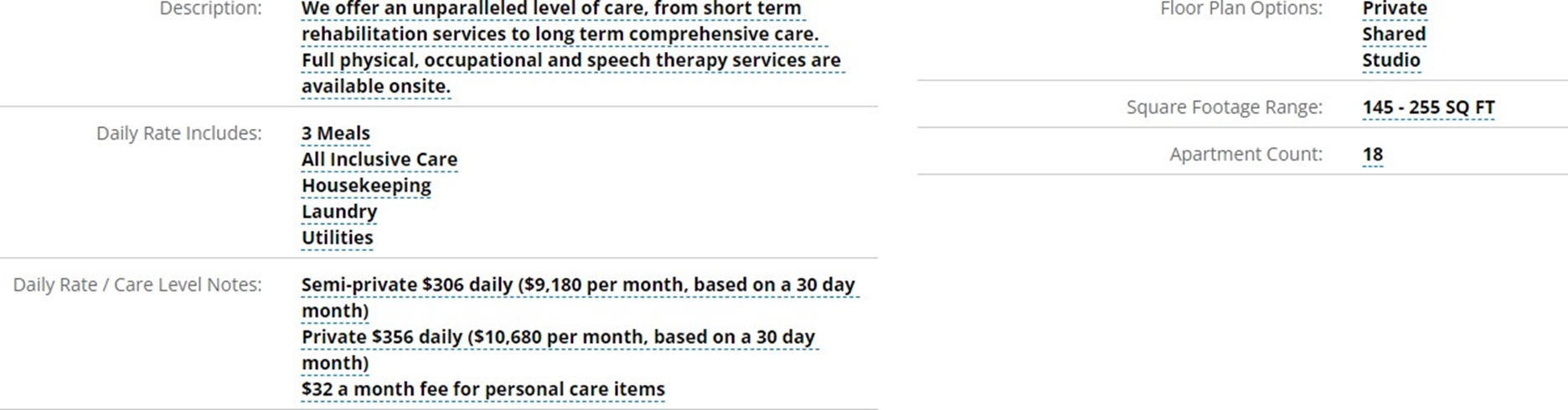
Note: If community does not offer Skilled/Rehab, list “N/A” in the Description field. If there is a nearby sister community that offer SNF/Rehab that the contact center can refer to, please list in the Description field.
Care Services
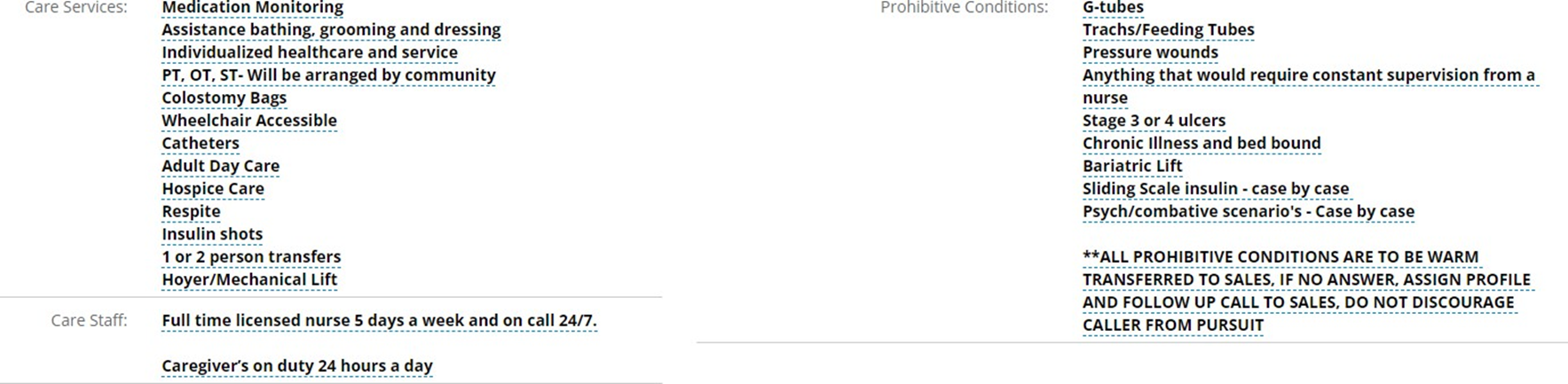
Care Services: List of care services that typically can be accommodated by community care staff Prohibitive Conditions: List of health conditions that typically cannot be cared for by community care staff.
Note: The contact center will use the list of Care Services and Prohibitive Conditions as a guide when deciding if scheduling a tour or a follow up call to discuss care needs is more appropriate.
Care Staff: List types of care givers available at community, both staffed by community and visiting care providers. Approximate staffing ratios for each level of care.
KMS Fields Explained
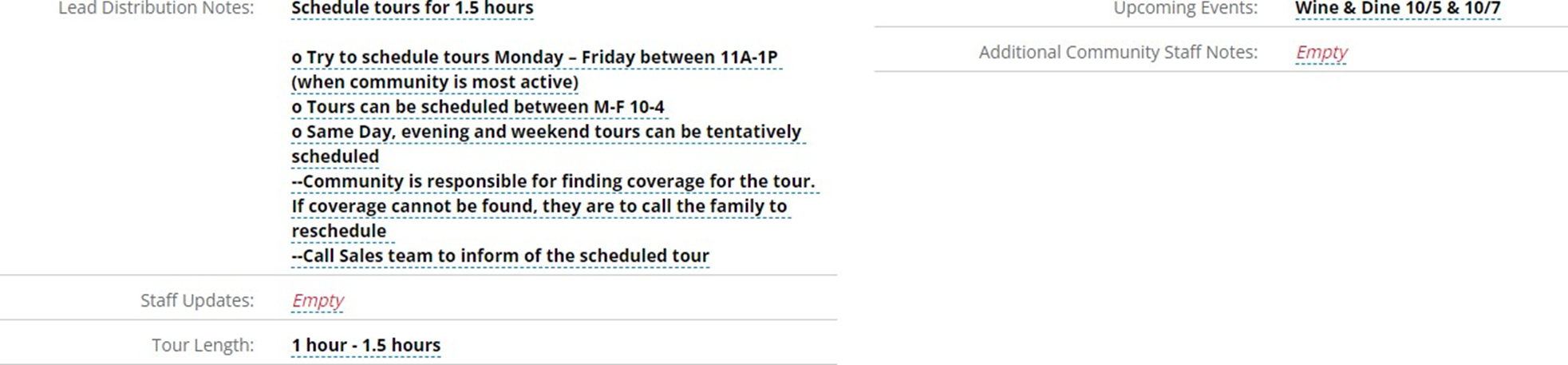
Lead Distribution Notes: Indicate days/times that tours can be booked (assuming sales counselor available), how to handle same day/evening/weekend requests and length of time to schedule tours for (consider including buffer time for post tour tasks).
Staff Updates: If/when staff changes occur, indicate update here. Likely blank for go- live.
Tour Length: Average length of tour – how long should the family plan to be at the community.
Upcoming Events: if not using the CRM Campaign feature, list any upcoming events that the contact center may receive calls for or that can be discussed during inquiry calls.
Additional Community Staff Notes: List information for non-CRM users that may be important for the sales cycle. For example, we may receive calls to speak to the move in coordinator that doesn’t have a CRM login.
KMS Users Tab
Sort
Primary contacts: Ranked as a 10
Backup contacts: Ranked in descending order starting with 9 (primary backup should be a 9, secondary backup an 8).
Other users: Individuals that are not sales contacts should remain ranked as 0
Schedule & Support
CRM Admins can add a note indicating schedule (calendars will be reviewed for specific date/time) and levels of care supported by the individual.
Cell/Work Phone
CRM Admins can enter the users cell/work number. Numbers should only be added if you wish for the contact center to use. We typically recommend against adding personal cell phone numbers.

Was this article helpful?
That’s Great!
Thank you for your feedback
Sorry! We couldn't be helpful
Thank you for your feedback
Feedback sent
We appreciate your effort and will try to fix the article