Dropped Batch Email Jobs Using Enquire MAP
- Get workflow_id from email
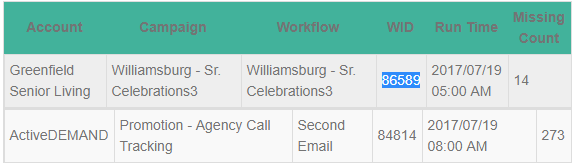
- Check Sidekiq > Busy tab to verify that it is being processed.
- Check that account's Account ID in account_campaigns in Queues. If either of these are there, it probably just needs time.
- Place the workflow_id into both spots of this query to see if the missing counts are equal.
select count(*)
from contacts_workflows
where workflow_id = 86589
and finished = 1
and contact_id not in (select contact_id from contact_histories where history_type = 'Email Log' and contact_id is not null and workflow_id = contacts_workflows.workflow_id
and contacts_workflows.contact_id = contact_histories.contact_id);
- If they are equal, put that same workflow_id into both spots of this query. Please Note: It is very important to not make an error here as it will send double emails.
update contacts_workflows
set finished = 0
where workflow_id = 86589
and finished = 1
and contact_id not in (select contact_id from contact_histories where history_type = 'Email Log' and contact_id is not null and workflow_id = contacts_workflows.workflow_id
and contacts_workflows.contact_id = contact_histories.contact_id);
Please reach out to the dedicated Enquire Account Manager or Enquire MAP Support team for further assistance.
Was this article helpful?
That’s Great!
Thank you for your feedback
Sorry! We couldn't be helpful
Thank you for your feedback
Feedback sent
We appreciate your effort and will try to fix the article